How to write FAQs that answer and sell
A good FAQ saves you calls and removes the doubts that stop people from buying. Here is how to find the questions, write the answers and place them well.
A good FAQ saves you phone calls and removes the doubts that stop people from buying. A weak one is a sales pitch dressed up as questions. This lesson shows how to find the questions people really ask, write answers that help and place them where they matter.
What an FAQ does for your business
FAQ stands for frequently asked questions. It is a short list of questions with short answers, and it does more work than most people expect.
- It saves you time. Every question you answer on the page is one less call, text or email.
- It removes doubts. People who hesitate often have one worry. Answer it and they move forward.
- It works when you are closed. Someone who is looking at your site at ten at night still gets an answer.
- It builds trust. A business that answers hard questions honestly, including the ones with a "no", looks like a business that has nothing to hide.
- It shows you the words customers use. Those words belong in the rest of your site too.
Find the questions people really ask
Do not invent your questions at a desk. Collect them from the places where customers already speak.
- Phone calls and voicemails. Note what people ask first.
- Emails, messages and the contact form on your site.
- Comments and direct messages on social media.
- Reviews, yours and your competitors'. Complaints are full of unanswered questions.
- What your staff hear every week. Ask them for the top five.
- Google itself. Type your service into the search box and look at the suggestions and at the "People also ask" box. They show real questions that people type.
- Online groups and forums where your customers talk to each other.
Keep a simple log for two weeks. Each time a customer asks something, write it down in their exact words. At the end, group the questions by moment: before they buy, while they buy and after they buy. The ones that repeat the most go on your page.
Choose questions that remove doubt
Almost every hesitation fits one of five doubts. Check that your FAQ covers each one that applies to you.
- Price: "How much does it cost?" or "What makes the price go up?"
- Time: "How long does it take?" or "When can you start?"
- Trust: "Are you licensed and insured?" or "Who will do the work?"
- Fit: "Do you work in my area?" or "Is this right for a small space?"
- Risk: "What if I am not happy?" or "Can I cancel?"
Include the uncomfortable questions too. If customers often ask about refunds, put the refund question on the page and answer it plainly. A clear "no" with a reason is better than silence. People trust a business that tells them what it does not do.
Write the question the way your customer says it
A question should sound like something a person would type or say. Use plain words, keep each question to one idea and avoid questions nobody asks, such as "Why are we the best?".
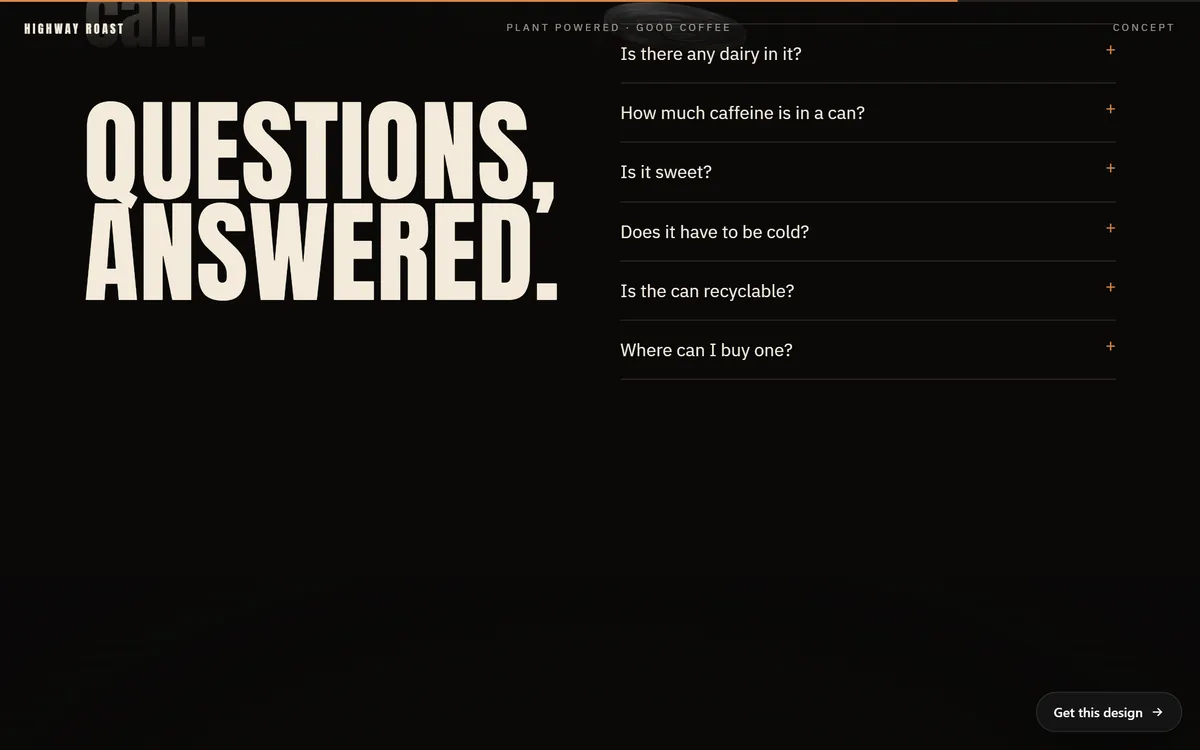
Highway Roast, a coffee concept site, has an FAQ headed "Questions, answered." Its questions are short and plain: "Is there any dairy in it?", "How much caffeine is in a can?", "Is it sweet?" and "Does it have to be cold?" Each one is a line a shopper might type into a search box. Each one opens to a short answer.
Answer in the first sentence
The best answers start with the answer. Say yes, no or the number first. Then add the reason or the detail in one or two sentences. If a next step fits, finish with it.
Look at how Highway Roast answers "Is there any dairy in it?" The answer on the page begins: "None." The next sentence says that the milk is oats, water and a pinch of sea salt, so nothing in the can came from an animal. A reader gets the answer in one word and the proof in one sentence.
Compare two answers for an imaginary dentist who is asked "Are you open on weekends?".
- Weak: "At Bright Smile we pride ourselves on offering flexible scheduling to fit your needs."
- Strong: "Yes, on Saturday mornings. We also keep two evenings a week for people who work days."
The strong version answers the question, and the weak version avoids it. Visitors notice.
A worked example: one question, three drafts
Take the question "Do you offer free estimates?" for an imaginary roofing company, and look at three drafts.
- Draft one: "We pride ourselves on transparent pricing and exceptional customer care." It never says yes or no.
- Draft two: "Yes, we offer free estimates." It answers, but it leaves the visitor wondering what happens next.
- Draft three: "Yes. We come to your home, look at the roof and give you a written estimate. The visit costs nothing, and you do not have to hire us. Call or send the form to pick a day."
Draft three answers first, says what happens and what it costs the visitor, removes the fear of pressure and ends with a step. It is only three sentences, and it does more than a long paragraph could. One warning: only write "free" when it truly is free, with no conditions hidden further down.
To write yours, answer each question the way you would on the phone, then cut the filler and add the missing fact. Start with your top five and you will already have most of the value.
Sell without sounding like a sales page
An FAQ sells by being honest and useful, not by pitching. A few habits help.
- Put the benefit inside the answer. "Yes, we clean up afterward, so you can use the room the same day" answers the question and sells the service.
- Close with an easy next step when it fits: "Not sure it fits your space? Call us and we will tell you."
- Do not use a question just to brag. "Why are we the best in town?" is not a question anyone asks.
- Do not dodge. If the honest answer is "it depends", say what it depends on.
Decide how many questions and in what order
Six to ten questions fit most pages. Put the most asked ones first. If you have more than ten, add short headings that group them, such as "Before you book", "On the day" and "After the job". A wall of forty questions is as hard to use as no FAQ at all.
Think about where each question belongs. A question about one service goes on that service's page, because the visitor is already there. A general FAQ page is useful when you have many questions that apply to the whole business. On the home page, show only the three or four that block the most sales.
Choose between an open list and an accordion
An accordion shows the questions and opens an answer when someone taps it. It keeps a long list short, and it works well on phones. Keep a few things in mind.
- The answers should be real text on the page, so that everyone, and every search tool, can read them.
- Show the two or three most important answers already open, or put them in the main text.
- Make the questions big enough to tap with a thumb.
FAQs and Google in 2026
Some older advice says to add special markup so that your questions show up in Google results. That has changed. Google's documentation says the FAQ rich result, the expandable questions that appeared under some search listings, stopped appearing in Google Search on May 7, 2026. Since September 2023 it had already been limited to well-known government and health websites.
The lesson is simple: write your FAQ for people, not for markup. A clear question with a direct answer helps a visitor on your page, whatever Google decides to show next year. Use Google's "People also ask" box as a source of ideas, and let your answers be honest and complete.
A chat assistant is an FAQ that talks back
Once you have a good list of questions and answers, you have the raw material for a chat assistant. Solvia, a community solar concept site, has a small chat window in the corner. A visitor can ask "Is there help for income-qualified households?", get an answer and see three suggested follow-ups: "What if I rent?", "How does billing work?" and "How do I subscribe?" The answers on this concept site are samples, and the window says so.
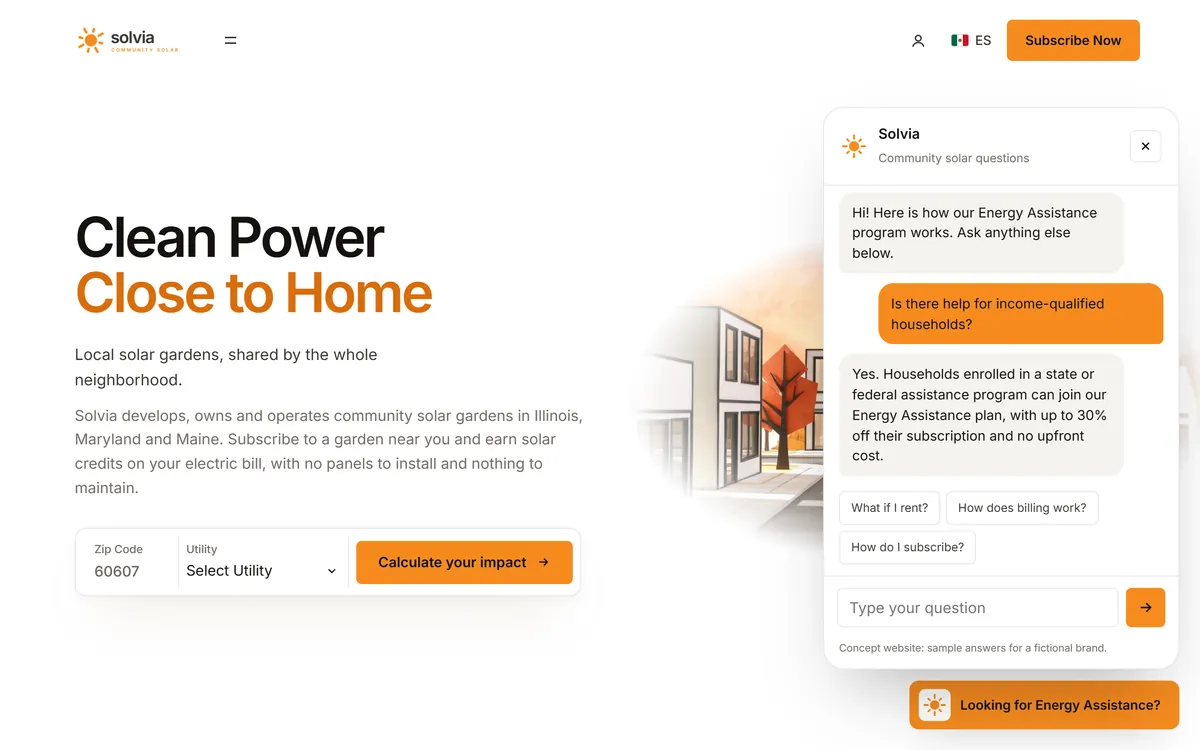
A chat assistant is not a replacement for a good FAQ. It is another way to deliver the same answers, at any hour. If you write the questions well, you write the assistant's knowledge at the same time.
Ten starter questions for almost any local business
Use these as prompts, and keep only the ones that apply. Answer each one in your own words, with your own facts.
- How much does it cost, and what changes the price?
- How long does it take?
- Do you work in my area?
- Are you licensed and insured? (If your work needs it.)
- What do I need to do before you start?
- Who will actually do the work?
- How and when do I pay?
- What if I am not happy?
- Can I cancel or reschedule?
- How do I get started?
Keep your FAQ up to date
An FAQ goes stale quickly. Prices change, hours change and policies change, and a wrong answer is worse than no answer. Every three months, read it again. Add the new questions you have heard, remove what no longer applies and check every number, date and policy against how you really work.
FAQ mistakes to avoid
- Questions nobody asks. "Why choose us?" is a sales line, not a question.
- Answers that avoid the question. Say yes, no or the number first.
- Too many questions. Keep the list useful, not exhaustive.
- Long answers. Two to four sentences are usually enough. If you need more, make a page for it.
- The same list on every page. Match the questions to what the visitor is reading.
- Old answers. Check dates, prices and policies regularly.
- Hiding the hard ones. The questions you would rather skip are the ones customers most want answered.
FAQs and Good Sites Only
We write the FAQ for your site from the answers you give us on day 1. Each stage has one round of changes, so you can correct any answer and add the question you hear most. If you want a chat assistant that answers visitors at any hour, a 24/7 chat assistant can be added as a monthly service, and it works from the same questions and answers. When you are ready, you can start your site.
Questions people ask
What is an FAQ page?
It is a page, or a section of a page, that lists common questions with short answers. It helps visitors find what they need without contacting you.
How many questions should an FAQ have?
Six to ten on most pages. If you have more, group them under short headings so people can find the right one fast.
How do I find out what questions to include?
Collect them from calls, emails, messages, reviews and your staff, and look at Google's suggestions and "People also ask" box for your service. Write each one in the customer's own words.
How long should an FAQ answer be?
Two to four sentences. Start with the answer, add the reason or detail, and finish with a next step if it fits.
Should I put an FAQ on every page?
Put a short, relevant list on service pages and a few key questions on the home page. A longer general FAQ can live on its own page.
Should my FAQ mention prices?
If customers ask about price, answer it. Give the price if it is fixed, or explain what affects it and how to get a quote.
Does an FAQ help my website show up on Google?
It helps visitors, and clear answers make your page more useful. But Google's FAQ rich result, the expandable questions in search listings, stopped appearing on May 7, 2026, so do not write an FAQ for that.
Is it better to use an accordion or an open list?
An accordion keeps a long list short and suits phones. Make sure the answers are real text on the page, and show the most important ones without a tap.
Can a chat assistant replace my FAQ?
It can deliver the same answers at any hour, but it works best when it is built on a good FAQ. Write the questions and answers first.
How often should I update my FAQ?
Read it every three months and whenever a price, a policy or your hours change. Add the new questions customers ask.
Want a website that does all of this? Start your site