Paid ads for beginners: where to start
Paid ads rent you attention, and they stop when you stop paying. Here is how they work, what they cost and five steps to start.
Paid ads put your business in front of people who are searching or scrolling right now, and you pay for the attention you get. They can be a fast way to reach new customers, but they are not magic, and they do not suit every business. This lesson explains how paid ads work, where they show up, how you pay and the five steps to start without wasting money.
Paid ads are rented attention
A paid ad is a message you pay a platform to show. You choose who should see it, where and how much you are willing to spend. The platform shows the ad, and you pay by its rules, usually when someone clicks or when the ad is shown a number of times.
Think of it as renting attention. While you pay, the ad runs and people see it. When you stop paying, the ad stops. That is the big difference from free ways of being found, like a Google Business Profile, a blog or regular social media posts. Those take longer to build, but they keep working without a daily bill.
Neither is better. Free work builds slowly and lasts. Paid work is fast and has to be refilled. Most businesses that use ads keep their free channels running too, because an ad can bring a person to your website, but your website, your profile and your reviews are what convince that person.
Where your ads can show up
Ads can appear in many places. This series focuses on the three places where most small businesses begin: Google, Facebook and Instagram.
- Google Search. Text ads on the results page, shown when someone types a search that matches your keywords. The person is looking for something right now.
- Video and websites on Google. Video ads on YouTube and Google's video partners, and image ads on websites that show Google ads. These reach people who are watching or reading, not searching.
- Facebook and Instagram. Ads inside the feeds and other parts of the apps, created in a tool called Meta Ads Manager. The person is scrolling and usually is not looking for you yet.
- Other platforms. Microsoft Advertising, TikTok, LinkedIn, Pinterest and Nextdoor, among others, sell ads too. They are worth a look later, once you know what works for your business.
The next lesson compares Google and Meta in detail. For now, keep one simple split in mind: on Google Search people ask, and on Facebook and Instagram people browse.
How you pay for ads
Each platform has its own way of charging, and its screens change often. Two ideas cover most of what you will see.
- You pay for clicks. On Google Search ads you usually pay when someone clicks your ad. This is called cost per click, or CPC.
- You pay for views. On Meta, many campaigns are charged by impressions, which are the times your ad is shown to a person. Some setups charge for clicks instead. The setup screen shows how your campaign will be charged.
In both cases you set a budget, and the platform spends it for you. You are not buying customers at a fixed price. You are buying chances, and the quality of your page and your offer decides how many chances turn into customers.
Words you will see
- Impression: one time your ad is shown.
- Click: one time a person taps or clicks your ad.
- Click-through rate (CTR): clicks divided by impressions.
- Cost per click (CPC): what you pay, on average, for each click.
- Conversion: the action you want, such as a call, a form or a booking.
- Cost per lead: what you pay, on average, for each person who contacts you.
A later lesson, how to know if your ads work, uses all of these words in one worked example.
Search ads and social ads work differently
A person who types "plumber near me" at 7 a.m. with water on the floor has a need and wants an answer now. A person who sees your ad between photos of friends is not looking for anything. You are interrupting them, so your ad has to earn a second of attention.
That difference shapes everything: which keywords or audiences you choose, how you write, what picture you use and what you can expect. Search ads tend to meet people who are ready to act. Social ads tend to introduce your business to people who might want it later. Both can work. They do different jobs, and you should not judge one by the rules of the other.
A click, step by step
It helps to follow one person from the ad to the sale, because every step is a place where you can win or lose them.
- The person sees your ad, either because they searched for something or because it appeared in a feed.
- They click or tap. This is the moment you pay on most search campaigns.
- They land on a page of your website. The first screen decides whether they stay.
- They read, look at photos and decide whether you seem right for them.
- They act: call, send a form, book, reserve or buy.
- You answer. Speed matters, because a person who asked three businesses will usually go with the first good reply.
- They become a customer, and, if you do a good job, they come back and tell others.
An ad only controls the first two steps. Your website and your own follow-up control the other five. That is why this series spends as much time on pages and measuring as it does on the ads themselves.
Pick a goal that fits your business
The goal is the action you want after the click. It should be something you can count, and it should lead to money. Here are examples from the concept websites we designed.
- A rafting company wants bookings for its river runs.
- A plant-based restaurant wants table reservations.
- A solar company wants roof visits and quote requests.
- A bicycle maker wants test ride requests.
- An online store wants purchases.
"More traffic" is not a goal, because traffic does not pay your bills. "Twelve reservation requests this month" is a goal, because you can count it and check it later.
Check that your business is ready
Ads make a good business easier to notice. They do not fix a business that is not ready. Before you spend, check these seven things.
- You know what you sell and to whom. You can say it in one sentence.
- You have a page that is ready for visitors. It loads quickly on a phone and makes the next step obvious.
- You know what a customer is worth. Without it, you cannot tell how much an ad is allowed to cost.
- You can answer fast. Someone checks the phone and the form inbox every day.
- You can count results. You can tell when a call, a form or a booking came from an ad.
- You have a budget you can afford to spend while you learn. The first weeks teach you what works.
- You can say why people should choose you. A clear offer beats a loud ad.
If two or three of these are missing, fix them first. A few hours spent on your website and your follow-up can matter more than a bigger ad budget.
Five steps to start
- Pick one goal. Choose the single action you want: calls, form submissions, bookings, reservations or online orders. One goal keeps your campaign simple and your results easy to read.
- Pick one audience and one area. Decide who you want to reach and where they are. A local business can start with its own city or service area. It does not need the whole country.
- Pick one platform. Start with Google if people already search for what you sell. Start with Facebook and Instagram if your product is visual or people do not yet know to look for it. The next lesson helps you decide.
- Pick one page. Choose the page where the ad sends people, and make sure it asks for the action from step 1. A later lesson in this series shows how.
- Set a small budget and a review date. Decide how much you will spend and when you will look at the results, before you start. Then let the ads run long enough to give you something to read.
What people see after they click
Every ad ends on a page. For the person who clicked, that page is your business. If it loads slowly, hides the next step or talks about something else, the money you spent on the click is gone.
The pages below are first screens from concept websites we designed. Each one shows what a visitor sees without scrolling. Use them as a picture of where an ad visitor should land.
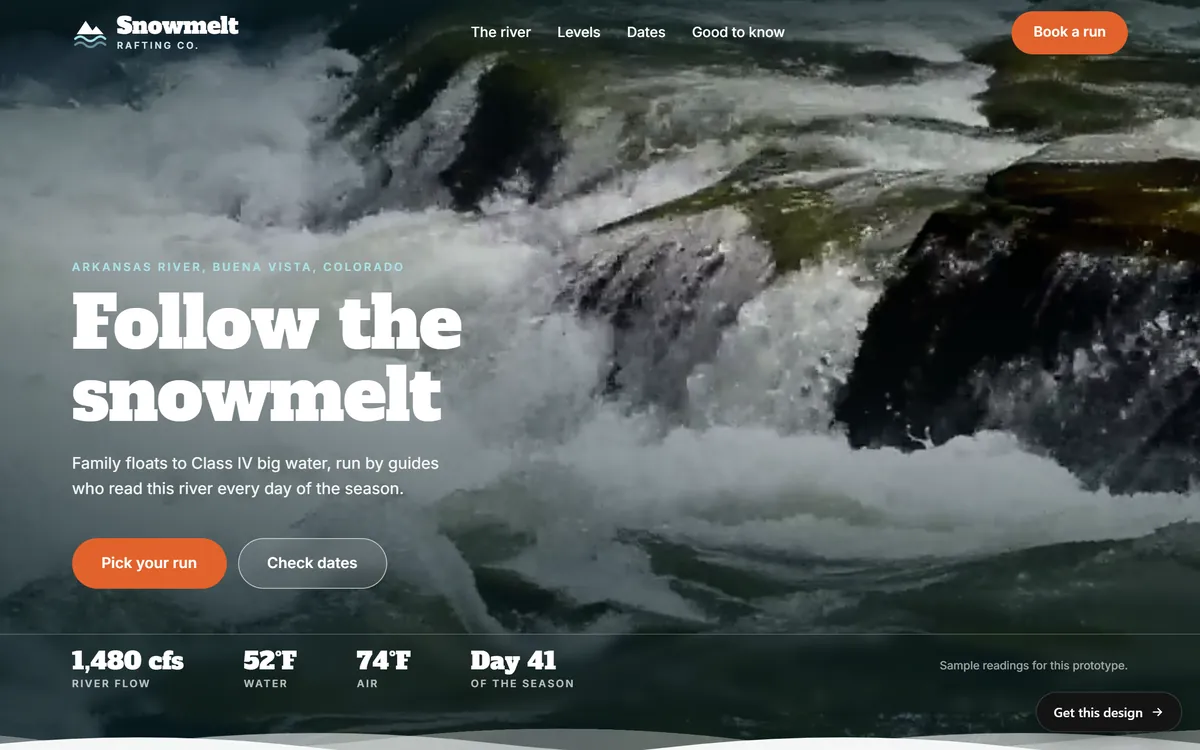
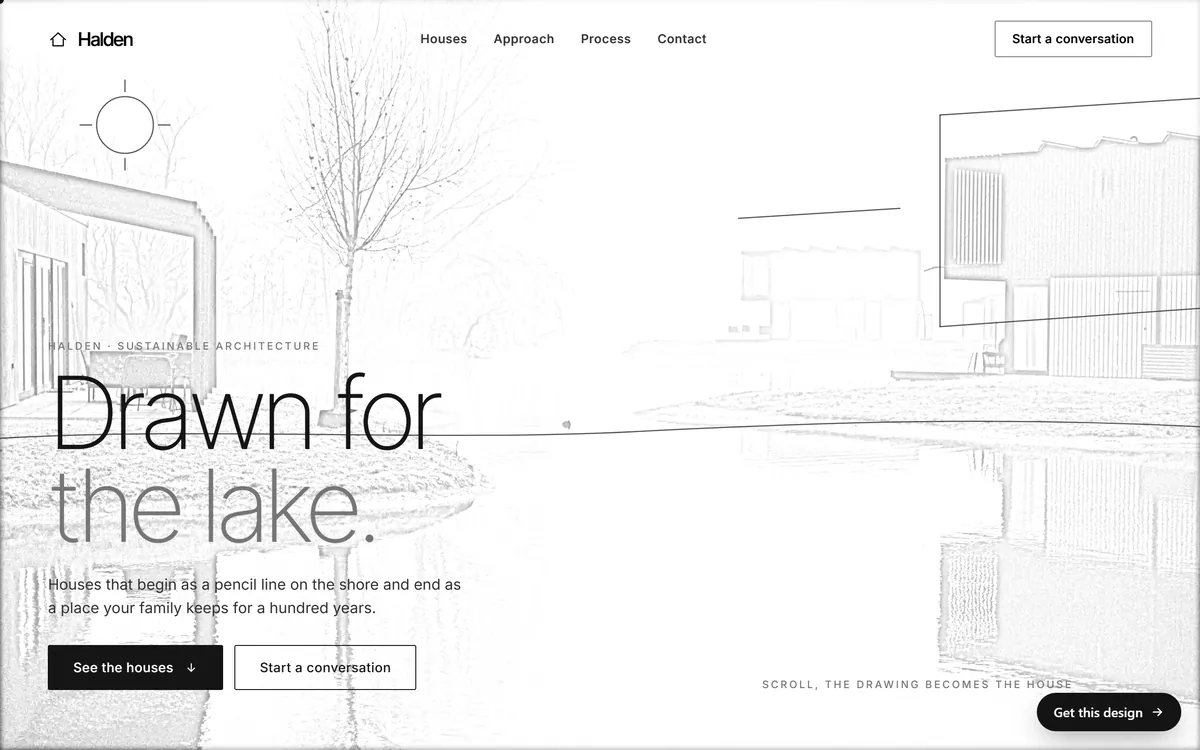
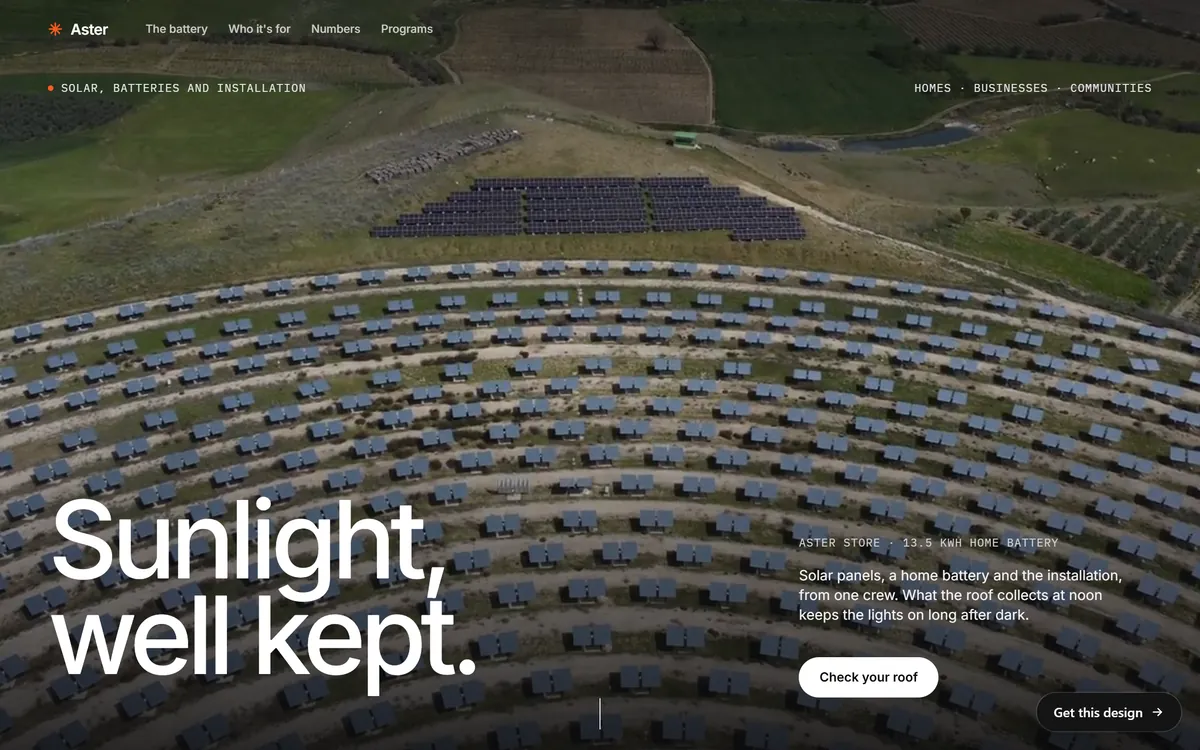
Notice what these screens have in common. Each one tells you what the business is within a second, and each one has a button that names the next step. None of them asks you to choose between six things.
What to expect in the first weeks
Expect a learning period. The platforms need data before they can aim your ads well, and so do you. In the first days the numbers move around a lot, and a single day tells you almost nothing.
- Treat the first campaign as research. It teaches you what your customers respond to.
- Remember that nobody can promise results. Be careful with anyone who guarantees clicks, leads or sales.
- Make small changes. Change one thing at a time so you know what caused a difference.
- Write everything down. Note the date, the budget and what you changed, so you can look back.
Beginner mistakes to avoid
- Starting with no goal, or with five goals at once.
- Sending everyone to the home page, whatever the ad says.
- Not counting results, so you cannot tell what works.
- Judging after two days, then changing everything.
- Spending money before the website and the phone are ready.
The last lesson of this series covers the most expensive ad mistakes in more detail, with a checklist to use before you launch.
Paid ads and your website
An ad can bring people to your site, but the site is what earns the call or the order. Every site we build includes design for your industry, texts written for your business, a mobile version and contact forms, so a person who arrives from an ad has something clear to read and an easy way to reach you. The ads themselves are made in the ad platforms, and the page they send people to is where our work comes in. You can see how these pages look in our designs.
Questions people ask
How do I start paid advertising for my small business?
Pick one goal, one audience, one platform and one page, then set a small budget and a date to review. Start with Google Ads if people already search for what you sell, or with Meta Ads, which cover Facebook and Instagram, if your product is visual. The five steps in this lesson walk you through it.
Are paid ads worth it for a small business?
They can be, when the business is ready for them: a clear offer, a page that works on phones, a way to answer people fast and a way to count results. Whether they pay off for you depends on what a customer is worth and what each customer costs to win. Nobody can promise it in advance, so start small and measure.
What is the difference between paid ads and organic marketing?
Organic marketing is what you do without paying for placement: your Google Business Profile, your website's search results, your posts and your email list. It builds slowly and lasts. Paid ads put your message in front of people right away and stop when you stop paying. Most businesses use both.
How do paid ads work?
You choose a goal, an audience or keywords, a budget and the ad itself. The platform shows your ad to people who match and charges you by its rules, for example for clicks or for views. You then read the reports on what happened and adjust.
What are the main types of paid ads?
Search ads are text ads on search results. Display ads are images on websites. Video ads run on platforms like YouTube. Social ads appear on Facebook and Instagram, and product ads promote items in online stores. A small business usually begins with search ads or social ads.
How much does it cost to start?
There is no fixed price. You choose your budget, and what each click or view costs depends on your industry, your area and the competition. The lesson on how much to spend on ads shows how to set a first budget with your own numbers.
How long do paid ads take to work?
Ads can start showing within a day or so, once the platform approves them, but the results take longer to read. Plan for a few weeks of data before you judge, and allow time again after each big change.
Do I need a website to run ads?
In most cases, yes. Ads need somewhere to send people, and a website is where they learn about you, trust you and contact you. Some Meta campaign types are built around messages or forms, so people may contact you without visiting a site, but you still need a place that shows who you are.
Which is better for beginners, Google Ads or Facebook ads?
Neither is better for everyone. Google Ads fits businesses that people search for. Facebook and Instagram ads fit businesses that sell visual products or need to be introduced. The next lesson helps you choose.
Can I run ads myself, or do I need a professional?
Many owners start on their own, and the platforms offer guided setups and help pages. A professional can save time once your budget or your campaigns grow. Whoever sets them up, you should know your goal, your budget and your results.
Want a website that does all of this? Start your site