How to study your competitors' websites
Your competitors' websites are free market research. Here is a seven-step method to learn from them without copying them.
Your competitors' websites are free market research. In about an hour you can learn what customers in your area see before they find you, which promises are common, what is missing and how you can stand out. This lesson gives you a simple method: find the right competitors, look at their sites the way a customer would, fill in a scorecard and turn what you learn into decisions. It is about learning, not copying.
Why an hour of this is worth your time
Before they choose, customers compare. They often have two or three tabs open, with you and your competitors side by side. If you know what is in those tabs, you can make your site clearer, faster or more helpful than the others. You will also spot the empty claims that everyone makes, such as "quality service" and "customer satisfaction", and you can avoid them.
Step 1: Choose three to five competitors
You need two kinds of competitors, and they are not always the same list.
- Local rivals. Businesses that a customer in your area could choose instead of you. Find them by searching as a customer would, and by asking your own customers who else they called.
- The best in your field. One or two sites from anywhere, for example a similar business in another city, that show what excellent looks like in your industry.
Keep the list to three to five. More than that turns into noise. Notice that the businesses Google shows for your service and your town are sometimes not the ones you think of as competitors, and the reverse. Both matter, because both are what customers see.
Step 2: Search like a customer
- Open a private window, so your own history does not change the results.
- Type what a customer types: your service and your city, such as "tire shop Denver", then the same with "near me", and then the problem, such as "flat tire repair".
- Note who appears in the ads at the top, who appears on the map and who appears in the regular results.
- Repeat on your phone. Results differ between devices and places, so search from the area you serve.
- Write down the names and the order in which they show up.
If you can, repeat the search on two different days. Ads and map results change from hour to hour, and a name that appears twice is a real competitor, not a coincidence. Save the web address of each one in your notes, so that you can open them quickly in the next step.
Step 3: Open each site on your phone first
Many local searches happen on phones, so that is where your competitors will be judged. Spend two minutes on each site, using only your thumb. Ask yourself four questions. What do I understand in five seconds? Is it fast? Can I tap to call? Is the text easy to read? Then open the same site on a computer and see what changes.
You can also try the five-second test. Open a competitor's home page, show the first screen to a friend for five seconds, then hide it and ask two questions: what does this company do, and what would you do next? If your friend cannot answer, customers cannot either. Do the same with your own site later.
Step 4: Fill in a scorecard
Use a notebook or a spreadsheet, with one column for each competitor and one for you. For each site, note these ten things.
- The promise. The headline and the first lines. What do they say they are, and for whom?
- The main button. What do they ask you to do first?
- The pages. What is in the menu, and what is missing?
- The proof. Reviews, ratings, numbers, licenses, awards and years in business.
- The price. Do they show prices, a "starting at" price or only "request a quote"?
- The photos. Real pictures of their work and team, or generic stock images?
- The phone experience. Speed, tap-to-call, readable text and forms that work.
- Contact and booking. How many ways to reach them, and do they promise a reply time?
- The tone. Formal, friendly, technical or plain-spoken?
- What is missing. The questions a customer would have that the site does not answer.
What a comparison looks like
The three concept sites below are in the same field, clean energy, and they are a good example of what a scorecard reveals. Same industry, three different audiences, promises and first steps.
Aster
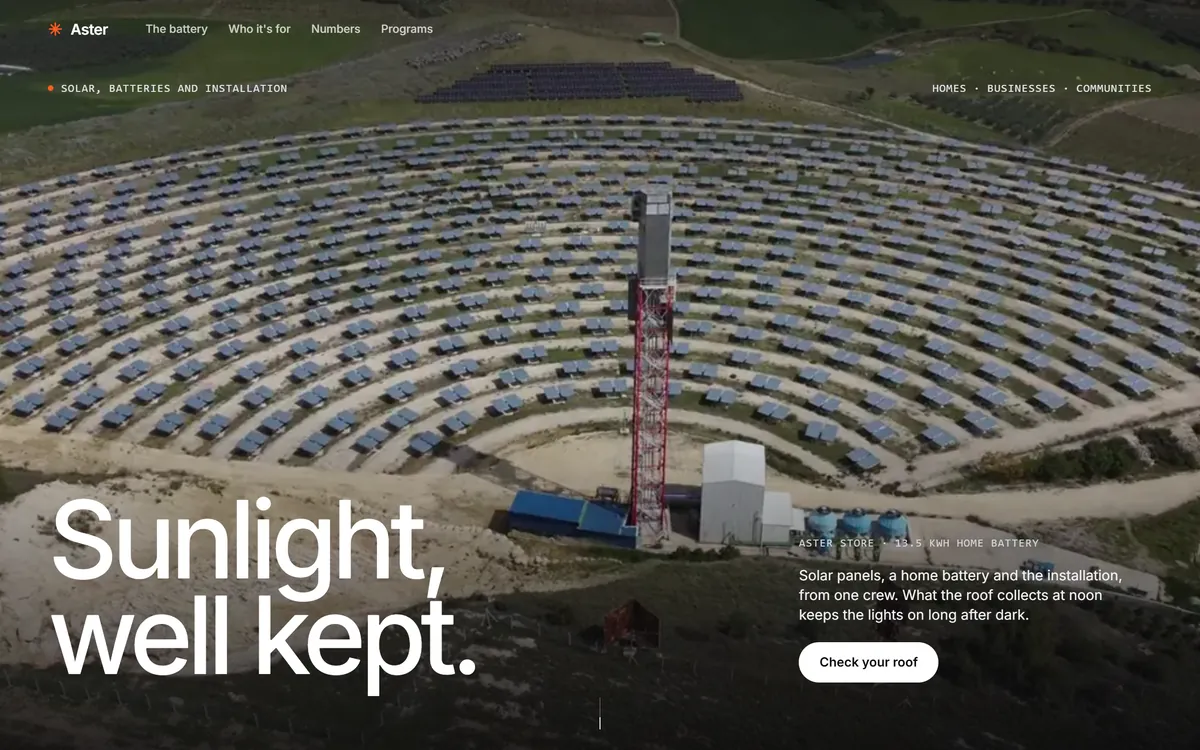
Aster leads with a promise in three words, "Sunlight, well kept.", over a large photo of a solar field. A line of text explains that the company offers panels, a home battery and the installation from one crew. There is one button, "Check your roof". Everything on the first screen points to homeowners and to one step.
Heliora
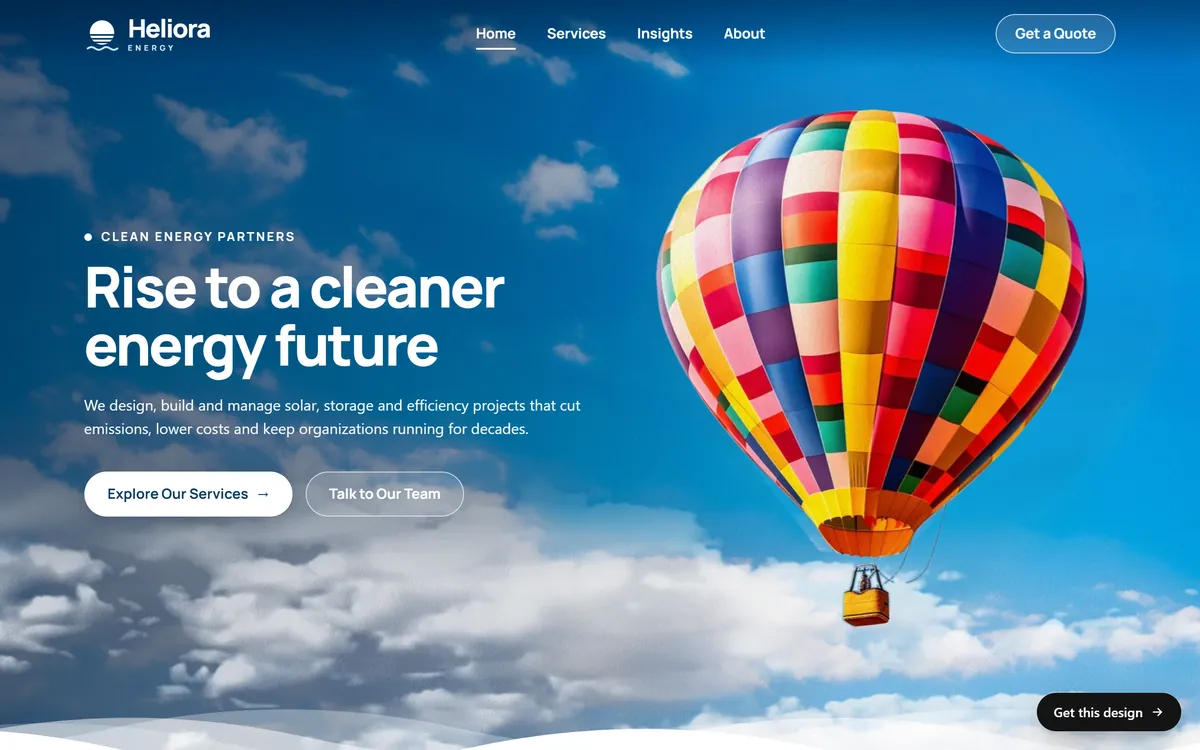
Heliora speaks to organizations. Its headline is "Rise to a cleaner energy future", and the line below talks about solar, storage and efficiency projects. It offers two buttons, "Explore Our Services" and "Talk to Our Team", and one more in the menu, "Get a Quote". Three ways in, for visitors at different stages of a decision.
Solvia
Solvia asks for a zip code before anything else. Its headline is "Clean Power Close to Home", and the first screen has a small form with a zip code and a list of utilities, plus a button, "Calculate your impact". The site starts a conversation with a question about you, not a statement about the company.
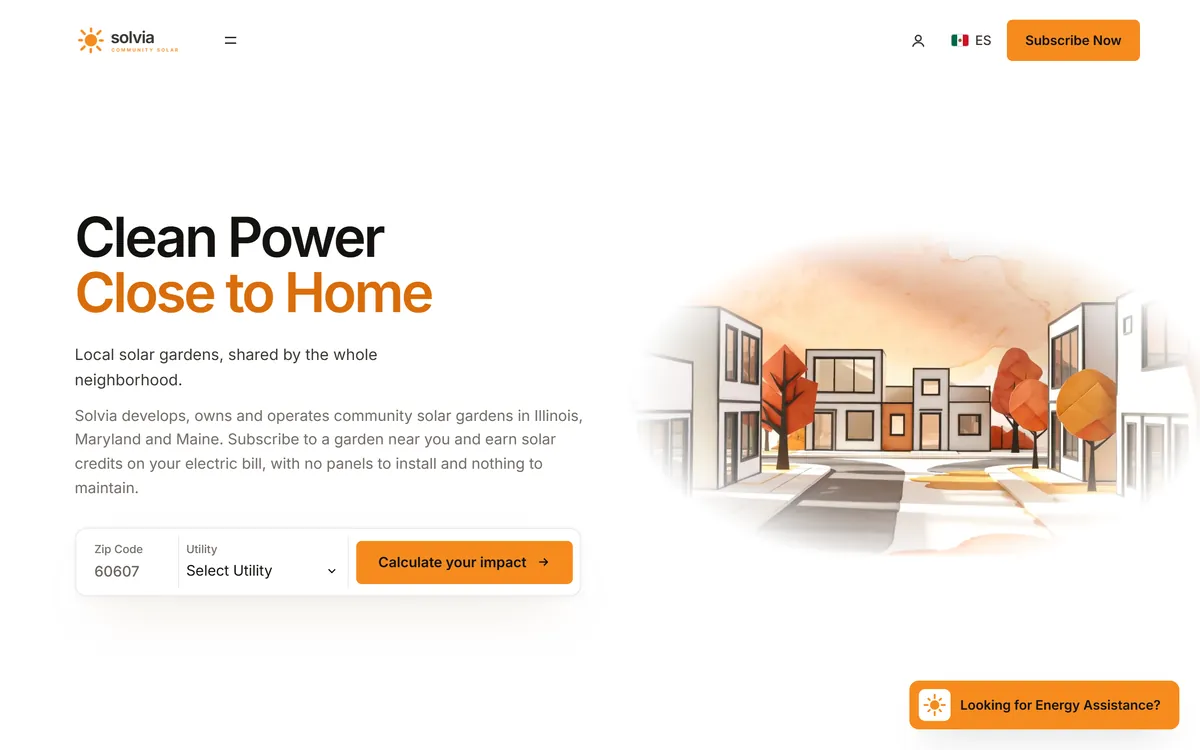
A scorecard for these three would show what they share, such as a clear button above the fold, and where they differ. That difference is what you are looking for in your own market.
Step 5: Look at their Google Business Profile
Search each competitor's name and look at their listing. Note how many reviews they have, the average rating, how recent the reviews are, their categories, their photos and their hours, and whether the owner answers reviews. Then read a handful of reviews, the good and the bad. Customers tell you what they value and what annoys them, in their own words. Those words are the ones your site should use.
Read reviews for patterns
Read at least ten reviews for each competitor and tally what comes up. If many good reviews praise "on time" and many bad ones complain about "no call back", you have learned that speed and communication matter in your market. Use those ideas on your own pages, and make sure your site shows that you are punctual and that you answer.
Step 6: Find the gaps
Make two lists. The first is what every competitor says. Those claims are the basics, and customers expect them. The second is what nobody says. Look for:
- Questions no site answers, about price, timing or process.
- Missing proof, such as reviews, photos of real work or guarantees.
- A weak phone experience, slow pages or tiny buttons.
- A service that nobody features, or a neighborhood that nobody covers.
- A tone that nobody uses, such as plain, friendly language in a field full of jargon.
Each gap is an opportunity for your site.
Step 7: Decide what you will do differently
Finish with three short decisions you can act on. "In the first line, we will say ___." "We will show ___ that nobody else shows." "Our main button will say ___." These three lines go straight into your plan from the previous lesson, and into the instructions for whoever builds your site.
A short example
Imagine a family dentist in Phoenix who studies four competitors. Three of them say "gentle care" in the headline. Two hide the cost of a first visit. None mentions evening hours, although the reviews show that patients want them. Two sites are slow on a phone, and only one shows photos of its real team.
The decisions write themselves: say "evening appointments" in the first line, show the cost of a first visit, use photos of the real team and make the phone number tappable. In one hour, a pile of web pages became four clear decisions.
Learn from them, do not copy them
- Do not copy words or photos. They are protected by copyright, and Google does not reward text that already exists elsewhere.
- Do not copy the look. If you look like them, customers have no reason to choose you.
- Copy the logic, not the surface. If three good sites put the phone number in the top corner, that is a pattern worth following.
- Do not imitate names, logos or claims. It confuses customers and can cause legal trouble.
- Stay public. Everything you need is on their website and in public listings. You do not need to pose as a customer or contact theirs.
Free tools that help
- A private browser window. For neutral search results.
- Google Maps. To see who is near you and what customers say.
- Your phone. The best test of how a competitor's site feels.
- PageSpeed Insights. A free Google tool that shows how fast a page loads on a phone. A later lesson covers it.
- A notes app or a spreadsheet. For your scorecard.
How often to repeat the study
Do it once before you build, and again once a year or when a new competitor appears. It takes an hour, and it keeps your site from drifting away from what customers see around you.
How Good Sites Only uses what you find
If none of our designs feels right for your business, you can show us two or three sites you like and we design yours from scratch. Your scorecard makes that conversation easy: it says what you like, what you want to avoid and where you want to stand out. You can browse the starting points in our designs.
Questions people ask
How do I find my competitors online?
Search for your service and your city the way a customer would, in a private window and on your phone. The businesses that appear in the ads, on the map and in the first results are your online competitors. Ask your customers who else they considered, and add any name that comes up more than once.
How many competitors should I study?
Three to five is enough. Add one or two outstanding sites from other cities to see what the best looks like. More than that gives you notes you will never use.
What should I look for on a competitor's website?
The promise in the first screen, the main button, the pages, the proof, the price, the photos, the phone experience, the ways to contact them, the tone and the questions they do not answer.
Is it okay to copy a competitor's website?
No. Their words and photos are protected by copyright, and copying them can lead to legal problems. Copying their look also makes you forgettable. Learn from their structure and their mistakes, and write your own content.
How do I know which keywords my competitors use?
Look at the title that appears on the browser tab of their pages, their headings and the words customers use in their reviews. Those give you a good first idea. A later lesson shows how to find the exact words your customers search for.
Do I need paid tools to study competitors?
No. A private browser window, Google Maps, your phone and a notebook are enough for a small business. Paid tools help with large markets, but they are not needed for this first study.
What if my competitors have bad websites?
That is a chance to stand out, but do not relax. Customers also compare you with the best businesses they have seen anywhere, not only with the weakest ones in your town. Aim for clear and helpful, not just better than the worst.
How often should I check my competitors?
Once before you build, and then about once a year. Check again when a new competitor opens or when your numbers suddenly change.
Should I look at competitors outside my city?
Yes, one or two. They will not take your customers, but they show what is possible in your field, and they can give you ideas for photos, pages and offers that nobody near you has tried.
What if my competitor is much bigger than me?
Study them anyway, but compare yourself with smaller, closer rivals as well. A large company can afford things you cannot, and its site often speaks to a wider audience. Your strength is being closer, more personal and easier to reach.
Want a website that does all of this? Start your site